We’re sorry to see you go! If you’re considering canceling your subscription, please know that we value you as a customer and would love the chance to address any concerns or feedback you might have. If you still wish to proceed, follow the steps below to ensure a smooth process:
Step-by-Step Guide
-
Access the Homepage
-
Navigate to the REIChat.AI homepage and log in to your account.

-
-
Go to Account Settings
-
Click on the Account option in the main menu.

-
-
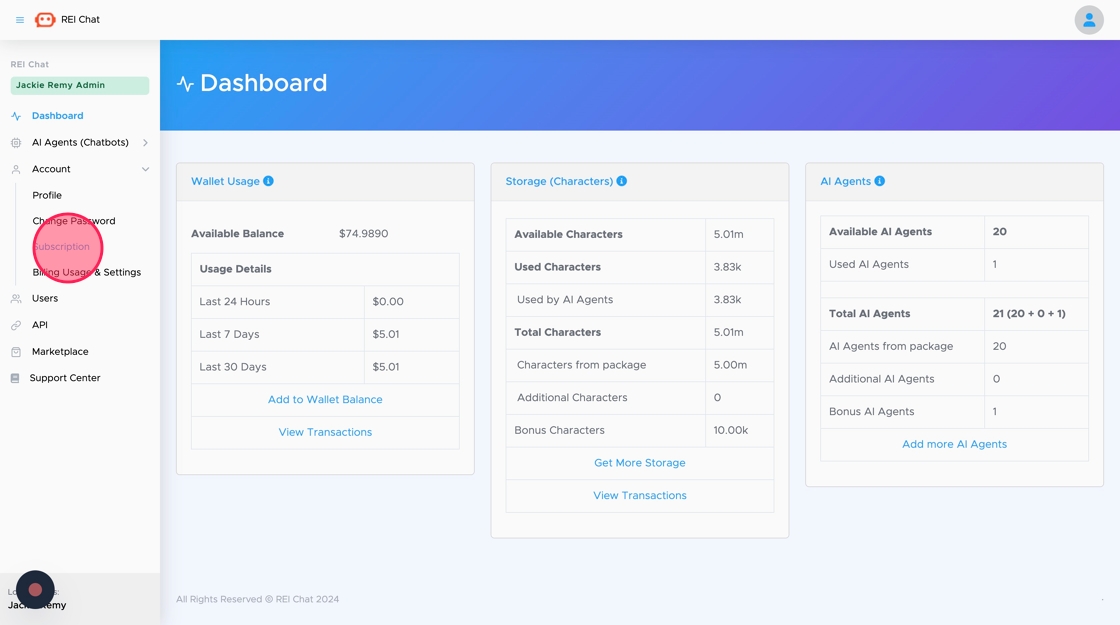
Open the Subscription Page
-
Select Subscription from the dropdown menu.
-
-
Select Your Subscription Level
-
Click on your current subscription level to view its details.

-
-
Initiate the Cancellation
-
Scroll down and click on the Cancel Your Subscription button.

-
-
Provide a Reason
-
Choose the reason for canceling your subscription from the available options.

-
-
Confirm Cancellation
-
Click the Yes, I’m Sure button to confirm your decision.

-
What Happens Next?
-
Your subscription will remain active until the end of the current billing cycle.
-
After the billing cycle ends, your subscription will be terminated, and you will lose access to REIChat.AI’s features.
We’re genuinely sorry to see you leave and hope you’ll consider coming back in the future. If there’s anything we can do to improve your experience or if you’d like assistance with any issues, our support team is here to help.